
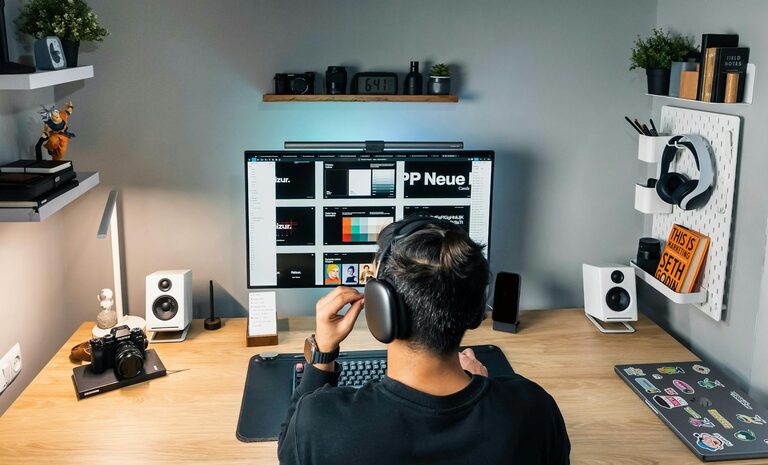
Creating a home office that’s both comfortable and productive can make a significant difference in how effectively you work from home. Whether you’re a full-time remote worker, a freelancer, or occasionally working from home, having a well-organized and inviting workspace can improve focus, reduce stress, and increase your overall job satisfaction. Here are some practical tips to help you set up a home office space that meets your needs and supports your best work.
Choose the Right Location
Find a Quiet Spot
Select a space in your home that is relatively quiet and separates work from relaxation areas. This separation helps your brain associate the space with productivity, making it easier to focus.
Consider Natural Light
If possible, set up your desk near a window. Natural light improves mood and reduces eye strain. However, avoid glare on your computer screen by positioning your desk perpendicular to the window.
Assess Space Needs
Make sure your chosen spot has enough room for your desk, chair, and any necessary equipment or storage. Being cramped can lead to discomfort and distraction.
Invest in an Ergonomic Setup
Choose a Comfortable Chair
An ergonomic chair that supports your back is essential. Look for adjustable height, lumbar support, and comfortable cushioning to help you maintain good posture.
Set Up Your Desk and Monitor Correctly
Your desk should be at a height where your forearms are parallel to the floor. Position your monitor so the top of the screen is at or just below eye level, about an arm’s length away. This setup minimizes neck and eye strain.
Use an Ergonomic Keyboard and Mouse
Consider ergonomic keyboards and mice to reduce wrist strain, especially if you spend many hours typing. A wrist rest can also provide added comfort.
Organize and Declutter
Keep Only What You Need
Limit your desk items to essentials such as your computer, notebooks, and a few tools you use daily. This minimizes distractions and keeps the space clean.
Use Storage Solutions
Incorporate shelves, drawers, or bins to store supplies, documents, and cables out of sight. A clutter-free environment helps you concentrate better.
Employ Cable Management
Tangled cords can be frustrating and look messy. Use cable organizers, clips, or sleeves to keep wires tidy and prevent tripping hazards.
Enhance Comfort and Ambience
Consider Lighting Options
In addition to natural light, use adjustable desk lamps with warm bulbs to reduce eye strain during darker hours. Soft lighting can make the space feel welcoming.
Add Personal Touches
Plants, artwork, or meaningful objects can brighten the room and boost your mood. However, avoid overdecorating — keep balance so your workspace remains functional.
Control Temperature and Air Quality
Ensure your home office has good ventilation and comfortable temperature. A small fan, heater, or air purifier can enhance your comfort.
Create a Routine and Set Boundaries
Define Work Hours
Set clear working hours and stick to them as much as possible. This approach helps create a mental separation between work time and personal time.
Minimize Interruptions
Inform family members or housemates of your schedule so they know when you can’t be disturbed. Consider noise-canceling headphones if needed.
Take Regular Breaks
Stand up, stretch, or take a short walk every hour. Breaks help refresh your mind and reduce fatigue, promoting sustained productivity.
Use Technology Wisely
Choose Reliable Equipment
Invest in a good computer, high-speed internet, and essential accessories like a webcam and microphone if you attend virtual meetings.
Utilize Productivity Tools
Apps for task management, time tracking, or note-taking can keep you organized and focused throughout the day.
Manage Notifications
Limit distractions by adjusting notification settings on your devices. Consider using “Do Not Disturb” modes during peak focus periods.
Maintain Healthy Habits
Practice Good Posture
Check your posture regularly to avoid slouching or leaning too much. This protects your back and neck from discomfort or injury.
Stay Hydrated and Nourished
Keep a bottle of water at your desk, and schedule breaks for healthy snacks to maintain energy levels.
Incorporate Movement
If possible, include standing or walking meetings or use a sit-stand desk to vary your posture during the day.
—
Setting up a home office that is comfortable and productive doesn’t have to be complicated or expensive. Small changes can have a big impact on how you feel during your workday and how much you get done. By choosing the right location, investing in ergonomic furniture, keeping organized, and establishing healthy routines, you’ll create a home office space that supports your success and well-being.